

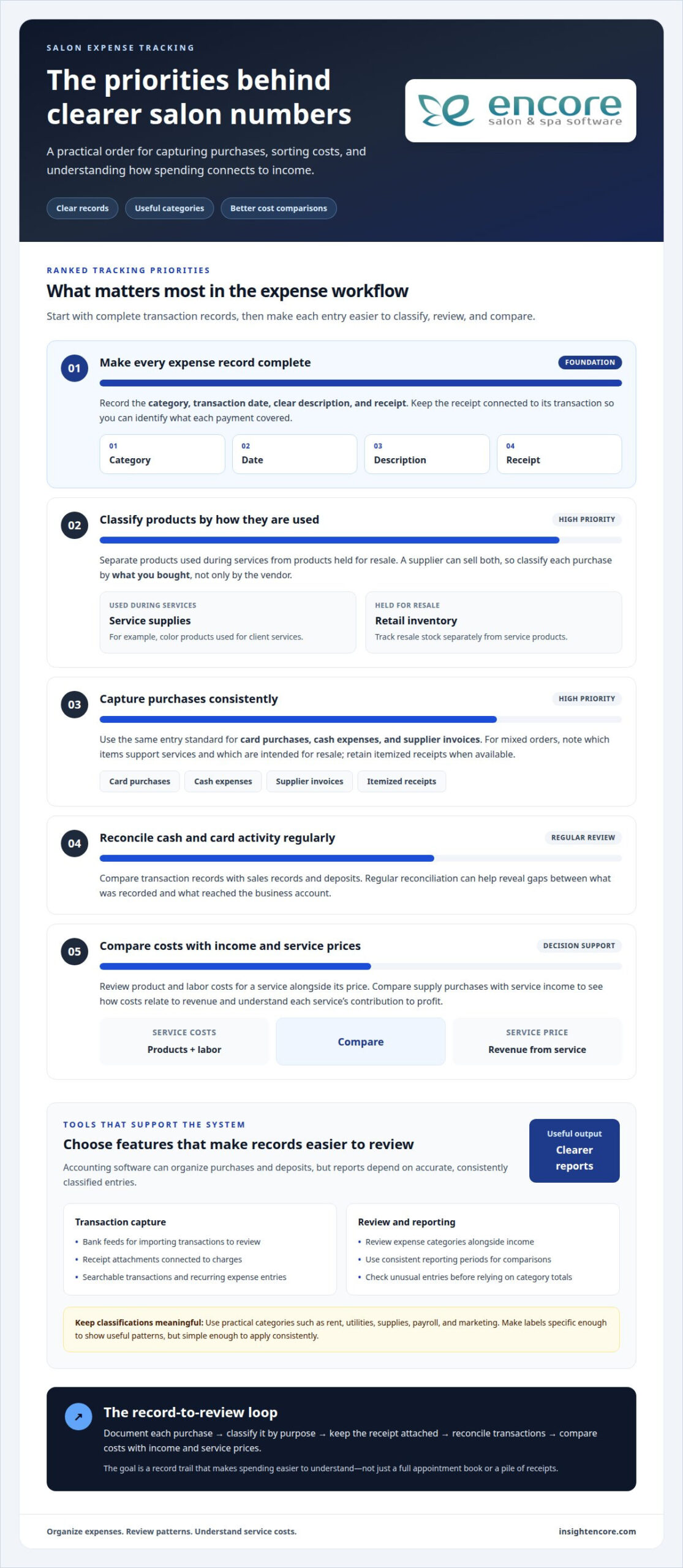
A full appointment book doesn’t automatically mean your salon keeps more of what it earns. The best way to track salon expenses is to record each business purchase with its date, category, description, and receipt, then regularly compare expenses with income and service costs.
Receipts and small purchases can easily slip through during a busy week. A consistent system makes spending easier to understand and helps you see whether services cover their product and labor costs.
This guide explains how to organize expense records, capture receipts, use accounting software, and keep transaction records in order. You’ll also learn how to compare costs with service profitability, so the numbers can support clearer business decisions.
Key Takeaways
- Choose accounting software that makes salon spending easier to organize and review alongside income.
- Keep receipts connected to clear expense records so purchases are easier to understand later.
- Separate retail inventory from products used during services to see where costs belong.
- Compare the product and labor costs of each service with its price to understand its contribution to profit.
- Reconcile cash and card transactions regularly to spot gaps between sales records and deposits.
Accounting software features for expense tracking
Salon accounting software turns individual purchases and deposits into organized records. Its value comes from making expenses easier to classify, review, and compare with income.
Expense Tracking Features
Expense tracking tools can capture purchases, assign categories, and connect transactions to supporting records. This structure helps salon owners distinguish recurring costs from one-off spending. For example, categorize color used for services as a service supply, while retail products for resale belong in inventory records. Clear categories help reports reflect what the business actually spends.
Useful tools may include bank feeds, receipt attachments, searchable transactions, and recurring expense entries. A bank feed can import transactions for review, while an attached receipt shows what a charge covered. Check imported entries carefully: one supplier may sell both backbar products and retail stock, which need different classifications. Consistent labels make comparisons more meaningful.
Software can organize income and spending into bookkeeping reports. For example, review supply purchases alongside service income, then investigate changes without sorting through a pile of receipts. Keep categories specific enough to reveal useful patterns, but simple enough to use consistently. A short list, such as rent, utilities, supplies, payroll, and marketing, is easier to maintain than dozens of overlapping labels.
Reporting Features
Reporting tools summarize recorded transactions into views of income, expenses, and financial activity. Use a defined reporting period to see which expense categories changed and how those changes relate to revenue. A profit-and-loss report, for example, groups income and outgoings for review instead of leaving every purchase as an isolated entry.
Reports are only as useful as the records behind them. If a supply purchase is mistakenly entered as equipment, the category totals can mislead. Review unusual entries and compare reports across consistent periods. The Internal Revenue Service states that the U.S. self-employment tax rate is 15.3%, comprising Social Security and Medicare taxes. The Internal Revenue Service also states that, in the United States, self-employed people file Schedule SE when net earnings are $400 or more. Organized records can make tax preparation more manageable, but software reports do not replace tax advice.
Plan options and pricing differ by the tools included, the number of users, and whether a business needs bookkeeping alone or salon operations features too. Compare what each plan covers, such as transaction records, reports, inventory, or appointment management, rather than choosing by name alone. The salon software pricing page is relevant when assessing plan options. Avoid paying for functions your workflow won’t use, and consider whether a salon-specific system can keep service and retail activity together.
Before choosing software, list the records you need to maintain: purchases, deposits, expense categories, and reports. Then check whether the system keeps those records easy to find and export. Accounting software supports expense tracking; Encore Salon & Spa Software can also connect financial activity with day-to-day operations. The right fit depends on whether your priority is bookkeeping, salon workflows, or a combination of both.
Recording expense categories, dates, descriptions, and receipts
A useful expense record includes a clear category, transaction date, description, and receipt. These details help you understand what each payment covered and find its supporting document later.
Setting Up Expense Categories
Expense categories group similar salon purchases so you can review spending by purpose. Start with labels that match real transactions, such as rent, utilities, beauty supplies, payroll, and marketing. A manageable set keeps records easier to maintain and reports readable. Add a category only when it distinguishes a meaningful type of spending from existing labels.
Keep category names distinct. For example, separate equipment purchases from routine supplies instead of placing both under a broad “salon costs” label. This helps show whether a transaction supports ongoing operations or a specific purchase. Review categories as the business changes, such as when you add retail products or a new service, and remove labels that no longer fit.
Customizing and Categorizing Expenses
Custom categories let you organize expenses around your services and purchasing habits. A beauty salon might separate color products from skincare supplies, while a business with retail sales could track resale stock separately from products used during services. This detail helps reveal where spending goes without creating a separate label for every supplier.
For each transaction, choose the category that reflects what you bought, not just the vendor’s name. A supplier may sell both retail items and backbar products, so the same vendor can appear in more than one category. Apply the same rule consistently. This makes comparisons useful across seasons, even as service demand and purchasing patterns shift.
Recording Expense Details
Each expense record should include its category, date, description, and receipt details. Use the transaction date shown on the receipt, then describe the purchase clearly, such as “hair color for client services” rather than “store purchase.” Attach or file the receipt with the record so the document and transaction stay connected.
Capture enough detail to identify each purchase later. For a mixed order, note which items supported services and which were intended for resale. If a receipt lists several products, keep the itemized document rather than recording only the total. A consistent naming format, such as supplier plus purchase purpose, makes searches faster and reduces confusion during bookkeeping reviews.
Set a simple standard for every entry: category, date, concise description, and receipt. Apply it to card purchases, cash expenses, and supplier invoices. When a record lacks one of those details, resolve it while the purchase is still familiar. A structured expense record helps owners trace a transaction from the bank statement to its business purpose. An organized way to manage salon records can support that routine.
Tracking salon costs and service profitability
Compare service revenue with the product and labor costs tied to each appointment, then account for shared overhead. The best way to track salon expenses also makes those costs useful for understanding which services contribute to profit.
Common Monthly Costs
Monthly costs are recurring expenses that keep a salon operating. Tracking them separately helps you see which commitments take the largest share of revenue and how much remains for other needs. Common categories include rent, utilities, supplies, payroll, marketing, insurance, and payment processing.
Costs vary with salon size and location.
Review each category on its own. Location, space, staffing, and purchasing patterns affect which expenses weigh most heavily on your salon.
Inventory, Product, and Supply Costs
Inventory records distinguish products held for resale from supplies used to perform services. Track retail stock as inventory, and record the cost of items sold as cost of goods sold. Backbar products consumed during appointments are operating costs, not resale stock.
For example, record shampoo sold to a client as retail inventory, but track color used during an appointment as a service supply. Compare purchases and product use with the services performed. If an appointment uses more product than expected, its margin can shrink even when revenue looks strong.
Service profitability compares what a service earns with its direct product and labor costs. Use the same method to compare services and see which contribute more toward shared expenses such as rent and utilities.
Potentially deductible salon costs are ordinary and necessary business expenses under Section 162 of the Internal Revenue Code. Keep records for rent, supplies, utilities, and payroll, and separate personal spending from salon transactions. A profit-and-loss report detailing income and outgoings can help a tax preparer review the business’s records.
Track tips separately from service revenue and payroll entries. Tips are taxable income that self-employed salon operators must report. To assess service profitability, connect labor and product costs to the work that generated them, then review those figures alongside shared overhead. That’s the best way to track salon expenses for this purpose.
Recording receipts and expenses regularly
A regular bookkeeping routine keeps salon income, spending, and receipts connected while details are easy to recall. Reconcile daily sales, then set aside time each week to update expense records and review cash flow.
Daily reconciliation gives you a timely view of money received. Compare the point-of-sale settlement and counted cash with the bank deposit, and investigate differences while the day’s transactions are still familiar. For example, a card sale recorded by the salon but missing from the settlement needs attention before it is mistaken for an expense or overlooked income.
Use your weekly bookkeeping session to collect receipts and enter outstanding purchases. Photograph paper receipts so the records remain accessible if the originals fade or get misplaced. Connect each image to its payment and add a short description, such as “color order for appointments.” This context makes reports clearer than a vendor name alone.
A dependable routine can follow this sequence:
- Gather paper receipts, emailed invoices, and card notifications from the week.
- Match each purchase to the bank or card transaction.
- Record the expense under the appropriate category and attach its receipt.
- Review income, spending, and available cash for unusual changes.
A weekly review helps you spot a supplier charge entered twice, a missing receipt, or a purchase assigned to the wrong category. It also creates a useful rhythm for tracking bills due and deposits expected. Cash flow is easier to understand when records include both money received and payments made, not just expenses.
Keep a short list of unresolved items during each review. A transaction with no receipt, an unclear card charge, or a deposit that differs from the sales record should stay visible until resolved. Note what needs attention, then update the entry when you find the supporting details. This prevents unexplained items from disappearing into a general expense category.
At the end of the week, review the updated records together, not just the latest receipt. Compare income with spending, scan category totals for unexpected changes, and check whether upcoming payments could affect operating cash. A brief note can explain a noticeable shift, such as a larger supply order or a quiet booking period. That context makes future reports more useful.
Daily reconciliation and weekly bookkeeping serve different purposes: one checks transaction accuracy, while the other keeps records complete. Together, they provide a repeatable view of cash flow and make reporting less dependent on memory at month-end.
Salon expense tracking and transaction records
Transaction records connect salon sales, expenses, and deposits across bank accounts, cards, and payment processors. Consistent reconciliation helps you identify missing deposits, duplicate entries, and unexplained differences.
Receipts and Tax Records
Tax records are documents that support the income and expenses reported by a U.S. salon. Keep receipts, supplier invoices, bank and card statements, sales reports, and payroll records together so each entry has supporting evidence. These documents show where reported figures came from and make a tax preparer’s review more straightforward.
Connect records to specific transactions. For example, match a supply invoice to its payment and expense entry, and retain sales reports showing income received. Organize files by date or accounting period, with clear names such as “supplier invoice” or “daily sales report.” Each record should make the business purpose and amount understandable without relying on memory.
Reconciling Accounts and Payment Records
Reconciliation compares recorded transactions with bank statements, card activity, and processor settlements. A salon’s sales total may differ from the amount deposited because of payment timing, refunds, or processing adjustments. Compare the point-of-sale settlement and counted cash with the bank deposit each day, then investigate differences promptly.
Use a separate bank account for salon transactions and keep personal spending in a personal account. Match each deposit to the sales record, and compare card batches with processor reports instead of assuming every sale appears as a separate bank deposit. Several card payments may be grouped into one settlement, so compare the batch total with its related transaction details.
For a practical reconciliation, review these records together:
- The salon’s point-of-sale report for the day’s sales, refunds, and payment types.
- The processor settlement showing card transactions and adjustments.
- The counted cash and the amount prepared for deposit.
- The bank activity showing deposits and other account transactions.
Record the reason for each difference, such as a refund, timing delay, or bank fee, and match it to supporting documentation. If a processor settlement doesn’t match recorded card sales, inspect the batch details before changing the bookkeeping entry. This preserves the original sales record and makes any adjustment traceable.
Reconcile card and bank activity regularly, and complete the cash-to-deposit comparison daily. That cadence gives salon owners and stylists a clearer transaction trail, while a shareable profit-and-loss report can summarize income and outgoings for tax preparation.
Encore Salon & Spa Software
Encore Salon & Spa Software brings salon operations together in one management platform, with tools for point-of-sale transactions, inventory tracking, and client management. If expense records feel disconnected from daily sales or product movement, these tools can help organize related business activity in one system.
Encore Salon Software, Encore Spa Software, Chair/Booth Renter Software, and Tattoo Studio Software serve different business settings. Choose the option that fits your operation, then use its management tools to support clearer tracking of sales and inventory alongside your expense-recording routine. Software can organize activity, but accurate categories and regular reconciliation remain essential to reliable bookkeeping.
If you’d like to discuss how Encore can support your salon’s recordkeeping, contact Encore Salon & Spa Software.
Make Your Records Work for What’s Next
Decide what you want your financial records to help you see. A clearer view can guide decisions about service mix, purchasing, staffing, and where to focus. The best way to track salon expenses is to build a routine you can sustain and use when decisions arise. Treat your records as a management tool, not just an end-of-year task.
As your salon evolves, revisit whether your tracking setup still reflects the way you work. New services, changing product use, or a different staffing model can make old categories less useful. Adjust the structure when it no longer supports the decisions you need to make, while keeping the process simple for your team to follow.
With a clear system in place, you can make decisions with greater confidence and a stronger understanding of your business.
Frequently Asked Questions
What expenses should a salon track?
Track every business outlay, including recurring bills, one-time purchases, subscriptions, and payment adjustments. For example, record a replacement styling tool separately from a routine supply order, and note refunds or supplier credits against the related transaction. Include costs paid by card, bank transfer, or cash. A complete expense picture helps you understand where money goes and how costs change as your salon’s services and operations evolve.
How do you set up a salon expense tracking system?
Choose one recordkeeping method, define categories that match your salon’s operations, and decide who enters and reviews transactions. For example, a salon manager could record purchases while the owner reviews entries and outstanding items each week. Use a consistent naming approach for digital receipts, such as supplier and purchase purpose. Keep the process simple enough for every team member who handles salon spending to follow.
What is the best bookkeeping software for salons, and how should you compare prices?
The right fit depends on whether you need bookkeeping alone or tools that also support salon operations. Compare what each plan includes, how pricing is structured, and whether it suits your team and location needs. A salon management platform such as Encore can bring point-of-sale activity and inventory tracking into salon workflows. Focus on the functions you’ll use regularly, rather than choosing software by its plan name alone.
How should salon expenses be categorized for bookkeeping and taxes?
Use categories that describe the business purpose of each purchase, and keep personal spending separate. If an order includes products for client services and items for resale, split the transaction across the appropriate records using the receipt’s item details. Apply the same approach to refunds and supplier credits, linking each adjustment to its original purchase. Clear, consistent entries help your bookkeeping reflect salon activity without treating every payment to one vendor alike.
How to track salon payroll, commissions, and tips
Record wages, commissions, and payroll taxes as payroll expenses, and track tips as income because self-employed salon operators must report them as taxable income. Payroll typically consumes 40 to 60 percent of gross revenue.
Disclaimer
This article is general in nature and may contain errors, please verify all claims with your sales rep